

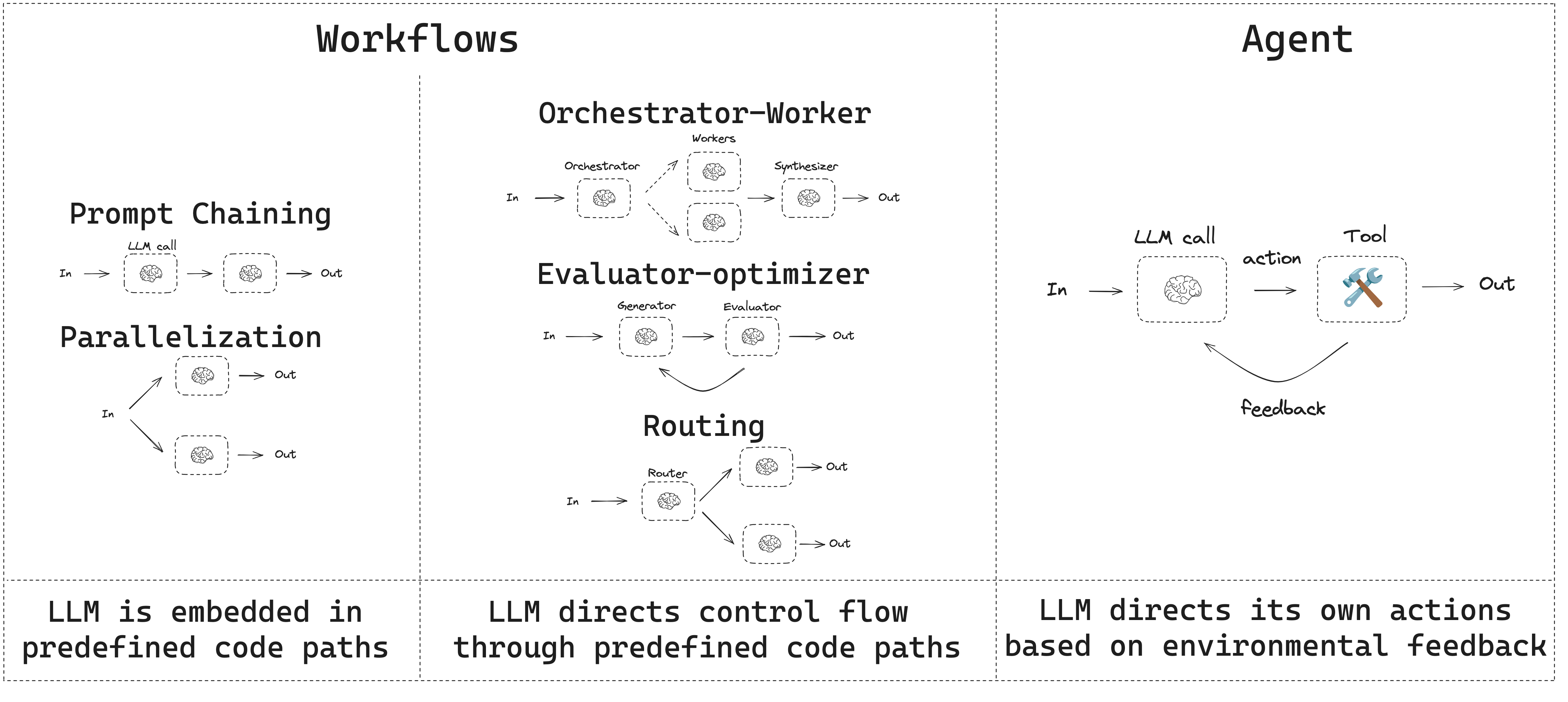
- 워크플로우는 미리 정해진 코드 경로를 가지며 특정 순서대로 동작하도록 설계됩니다.
- 에이전트는 동적이며 자체적으로 프로세스와 도구 사용을 정의합니다.
설정
워크플로우나 에이전트를 구축하려면 구조화된 출력과 도구 호출을 지원하는 모든 채팅 모델을 사용할 수 있습니다. 다음 예제는 Anthropic을 사용합니다:- 종속성 설치
Copy
npm install @langchain/langgraph @langchain/core
- LLM 초기화:
Copy
import { ChatAnthropic } from "@langchain/anthropic";

const llm = new ChatAnthropic({
  model: "claude-sonnet-4-5",
  apiKey: "<your_anthropic_key>"
});
LLM과 확장 기능
워크플로우와 에이전트 시스템은 LLM과 여기에 추가하는 다양한 확장 기능을 기반으로 합니다. 도구 호출, 구조화된 출력, 단기 메모리는 필요에 맞게 LLM을 조정하기 위한 몇 가지 옵션입니다.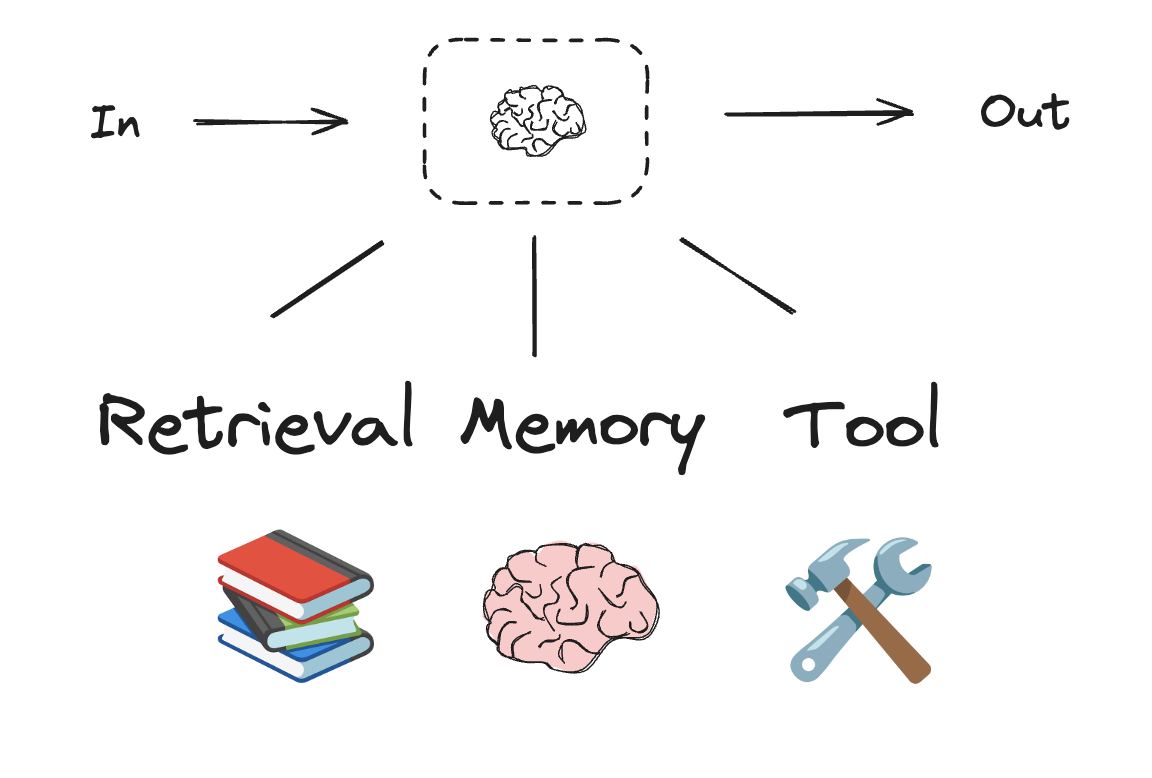
Copy
import * as z from "zod";
import { tool } from "langchain";

// 구조화된 출력을 위한 스키마
const SearchQuery = z.object({
  search_query: z.string().describe("Query that is optimized web search."),
  justification: z
    .string()
    .describe("Why this query is relevant to the user's request."),
});

// 구조화된 출력을 위한 스키마로 LLM 확장
const structuredLlm = llm.withStructuredOutput(SearchQuery);

// 확장된 LLM 호출
const output = await structuredLlm.invoke(
  "How does Calcium CT score relate to high cholesterol?"
);

// 도구 정의
const multiply = tool(
  ({ a, b }) => {
    return a * b;
  },
  {
    name: "multiply",
    description: "Multiply two numbers",
    schema: z.object({
      a: z.number(),
      b: z.number(),
    }),
  }
);

// 도구로 LLM 확장
const llmWithTools = llm.bindTools([multiply]);

// 도구 호출을 트리거하는 입력으로 LLM 호출
const msg = await llmWithTools.invoke("What is 2 times 3?");

// 도구 호출 가져오기
console.log(msg.tool_calls);
프롬프트 체이닝
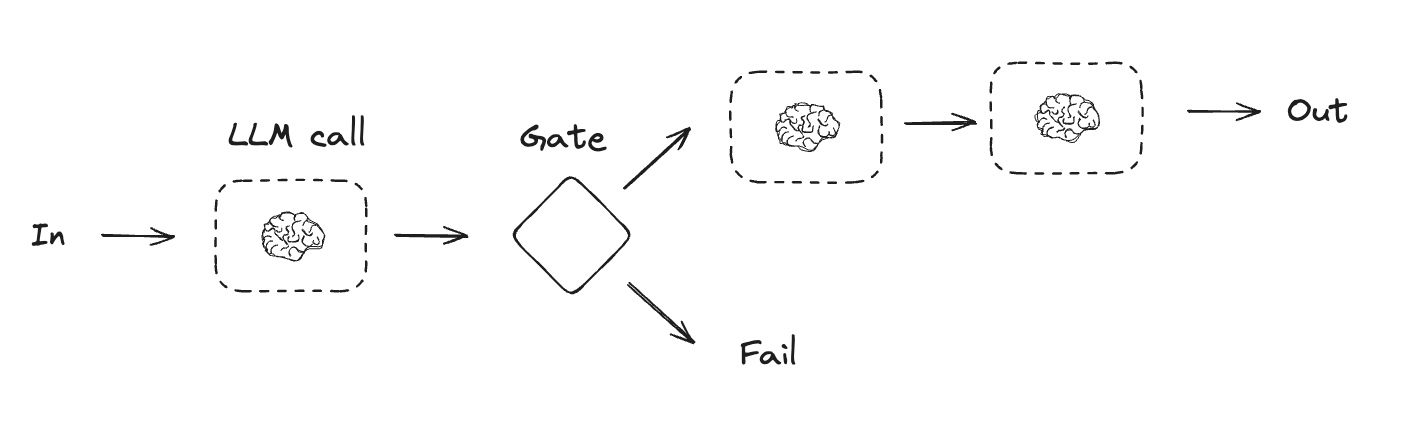
프롬프트 체이닝은 각 LLM 호출이 이전 호출의 출력을 처리하는 방식입니다. 이는 잘 정의된 작업을 더 작고 검증 가능한 단계로 나누어 수행할 때 자주 사용됩니다. 몇 가지 예시는 다음과 같습니다:- 문서를 다른 언어로 번역하기
- 생성된 콘텐츠의 일관성 검증하기
Copy
import { StateGraph, Annotation } from "@langchain/langgraph";

// 그래프 상태
const StateAnnotation = Annotation.Root({
  topic: Annotation<string>,
  joke: Annotation<string>,
  improvedJoke: Annotation<string>,
  finalJoke: Annotation<string>,
});

// 노드 함수 정의

// 초기 농담을 생성하는 첫 번째 LLM 호출
async function generateJoke(state: typeof StateAnnotation.State) {
  const msg = await llm.invoke(`Write a short joke about ${state.topic}`);
  return { joke: msg.content };
}

// 농담에 펀치라인이 있는지 확인하는 게이트 함수
function checkPunchline(state: typeof StateAnnotation.State) {
  // 간단한 확인 - 농담에 "?"나 "!"가 포함되어 있는가?
  if (state.joke?.includes("?") || state.joke?.includes("!")) {
    return "Pass";
  }
  return "Fail";
}

  // 농담을 개선하는 두 번째 LLM 호출
async function improveJoke(state: typeof StateAnnotation.State) {
  const msg = await llm.invoke(
    `Make this joke funnier by adding wordplay: ${state.joke}`
  );
  return { improvedJoke: msg.content };
}

// 최종 다듬기를 위한 세 번째 LLM 호출
async function polishJoke(state: typeof StateAnnotation.State) {
  const msg = await llm.invoke(
    `Add a surprising twist to this joke: ${state.improvedJoke}`
  );
  return { finalJoke: msg.content };
}

// 워크플로우 구축
const chain = new StateGraph(StateAnnotation)
  .addNode("generateJoke", generateJoke)
  .addNode("improveJoke", improveJoke)
  .addNode("polishJoke", polishJoke)
  .addEdge("__start__", "generateJoke")
  .addConditionalEdges("generateJoke", checkPunchline, {
    Pass: "improveJoke",
    Fail: "__end__"
  })
  .addEdge("improveJoke", "polishJoke")
  .addEdge("polishJoke", "__end__")
  .compile();

// 실행
const state = await chain.invoke({ topic: "cats" });
console.log("Initial joke:");
console.log(state.joke);
console.log("\n--- --- ---\n");
if (state.improvedJoke !== undefined) {
  console.log("Improved joke:");
  console.log(state.improvedJoke);
  console.log("\n--- --- ---\n");

  console.log("Final joke:");
  console.log(state.finalJoke);
} else {
  console.log("Joke failed quality gate - no punchline detected!");
}
병렬화
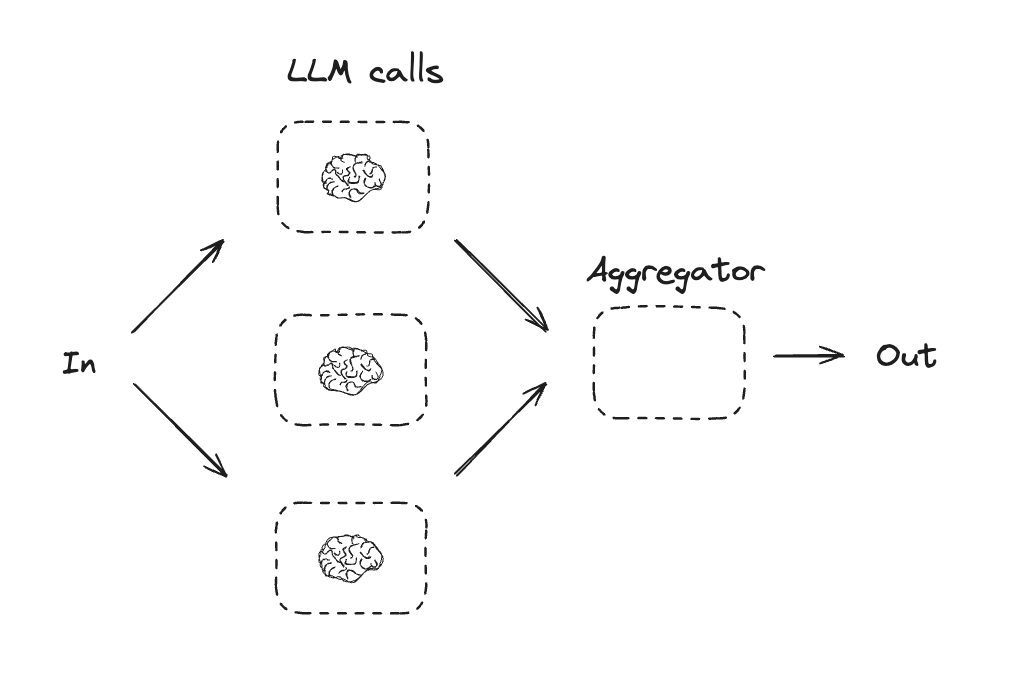
병렬화는 LLM들이 작업에 대해 동시에 작업하는 방식입니다. 이는 여러 독립적인 하위 작업을 동시에 실행하거나, 다른 출력을 확인하기 위해 동일한 작업을 여러 번 실행하는 방식으로 수행됩니다. 병렬화는 일반적으로 다음과 같은 경우에 사용됩니다:- 하위 작업을 분할하여 병렬로 실행하여 속도를 높임
- 다른 출력을 확인하기 위해 작업을 여러 번 실행하여 신뢰도를 높임
- 문서에서 키워드를 처리하는 하나의 하위 작업과 서식 오류를 확인하는 두 번째 하위 작업을 동시에 실행
- 인용 횟수, 사용된 소스 수, 소스의 품질과 같이 다른 기준에 따라 문서의 정확성을 평가하는 작업을 여러 번 실행
Copy
import { StateGraph, Annotation } from "@langchain/langgraph";

// 그래프 상태
const StateAnnotation = Annotation.Root({
  topic: Annotation<string>,
  joke: Annotation<string>,
  story: Annotation<string>,
  poem: Annotation<string>,
  combinedOutput: Annotation<string>,
});

// 노드
// 초기 농담을 생성하는 첫 번째 LLM 호출
async function callLlm1(state: typeof StateAnnotation.State) {
  const msg = await llm.invoke(`Write a joke about ${state.topic}`);
  return { joke: msg.content };
}

// 이야기를 생성하는 두 번째 LLM 호출
async function callLlm2(state: typeof StateAnnotation.State) {
  const msg = await llm.invoke(`Write a story about ${state.topic}`);
  return { story: msg.content };
}

// 시를 생성하는 세 번째 LLM 호출
async function callLlm3(state: typeof StateAnnotation.State) {
  const msg = await llm.invoke(`Write a poem about ${state.topic}`);
  return { poem: msg.content };
}

// 농담, 이야기, 시를 단일 출력으로 결합
async function aggregator(state: typeof StateAnnotation.State) {
  const combined = `Here's a story, joke, and poem about ${state.topic}!\n\n` +
    `STORY:\n${state.story}\n\n` +
    `JOKE:\n${state.joke}\n\n` +
    `POEM:\n${state.poem}`;
  return { combinedOutput: combined };
}

// 워크플로우 구축
const parallelWorkflow = new StateGraph(StateAnnotation)
  .addNode("callLlm1", callLlm1)
  .addNode("callLlm2", callLlm2)
  .addNode("callLlm3", callLlm3)
  .addNode("aggregator", aggregator)
  .addEdge("__start__", "callLlm1")
  .addEdge("__start__", "callLlm2")
  .addEdge("__start__", "callLlm3")
  .addEdge("callLlm1", "aggregator")
  .addEdge("callLlm2", "aggregator")
  .addEdge("callLlm3", "aggregator")
  .addEdge("aggregator", "__end__")
  .compile();

// 실행
const result = await parallelWorkflow.invoke({ topic: "cats" });
console.log(result.combinedOutput);
라우팅
라우팅 워크플로우는 입력을 처리한 다음 컨텍스트별 작업으로 지시합니다. 이를 통해 복잡한 작업에 대한 전문화된 플로우를 정의할 수 있습니다. 예를 들어, 제품 관련 질문에 답변하기 위해 구축된 워크플로우는 먼저 질문 유형을 처리한 다음 가격, 환불, 반품 등에 대한 특정 프로세스로 요청을 라우팅할 수 있습니다.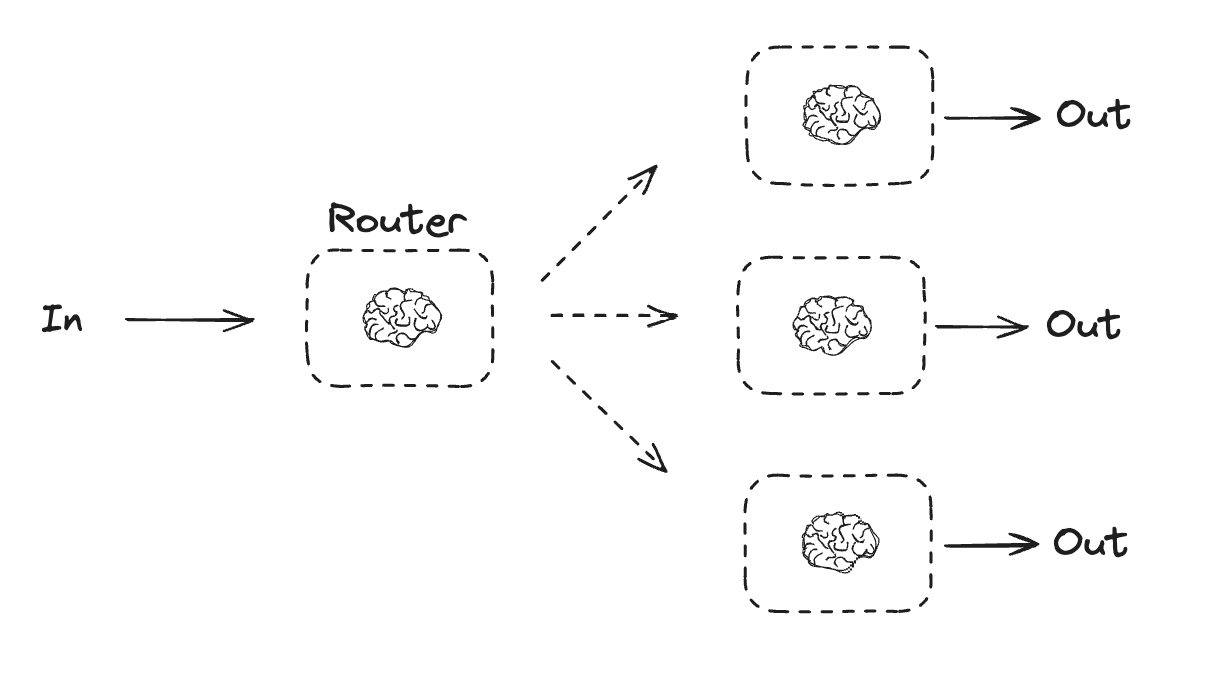
Copy
import { StateGraph, Annotation } from "@langchain/langgraph";
import * as z from "zod";

// 라우팅 로직으로 사용할 구조화된 출력을 위한 스키마
const routeSchema = z.object({
  step: z.enum(["poem", "story", "joke"]).describe(
    "The next step in the routing process"
  ),
});

// 구조화된 출력을 위한 스키마로 LLM 확장
const router = llm.withStructuredOutput(routeSchema);

// 그래프 상태
const StateAnnotation = Annotation.Root({
  input: Annotation<string>,
  decision: Annotation<string>,
  output: Annotation<string>,
});

// 노드
// 이야기 작성
async function llmCall1(state: typeof StateAnnotation.State) {
  const result = await llm.invoke([{
    role: "system",
    content: "You are an expert storyteller.",
  }, {
    role: "user",
    content: state.input
  }]);
  return { output: result.content };
}

// 농담 작성
async function llmCall2(state: typeof StateAnnotation.State) {
  const result = await llm.invoke([{
    role: "system",
    content: "You are an expert comedian.",
  }, {
    role: "user",
    content: state.input
  }]);
  return { output: result.content };
}

// 시 작성
async function llmCall3(state: typeof StateAnnotation.State) {
  const result = await llm.invoke([{
    role: "system",
    content: "You are an expert poet.",
  }, {
    role: "user",
    content: state.input
  }]);
  return { output: result.content };
}

async function llmCallRouter(state: typeof StateAnnotation.State) {
  // 입력을 적절한 노드로 라우팅
  const decision = await router.invoke([
    {
      role: "system",
      content: "Route the input to story, joke, or poem based on the user's request."
    },
    {
      role: "user",
      content: state.input
    },
  ]);

  return { decision: decision.step };
}

// 적절한 노드로 라우팅하는 조건부 엣지 함수
function routeDecision(state: typeof StateAnnotation.State) {
  // 다음으로 방문할 노드 이름 반환
  if (state.decision === "story") {
    return "llmCall1";
  } else if (state.decision === "joke") {
    return "llmCall2";
  } else if (state.decision === "poem") {
    return "llmCall3";
  }
}

// 워크플로우 구축
const routerWorkflow = new StateGraph(StateAnnotation)
  .addNode("llmCall1", llmCall1)
  .addNode("llmCall2", llmCall2)
  .addNode("llmCall3", llmCall3)
  .addNode("llmCallRouter", llmCallRouter)
  .addEdge("__start__", "llmCallRouter")
  .addConditionalEdges(
    "llmCallRouter",
    routeDecision,
    ["llmCall1", "llmCall2", "llmCall3"],
  )
  .addEdge("llmCall1", "__end__")
  .addEdge("llmCall2", "__end__")
  .addEdge("llmCall3", "__end__")
  .compile();

// 실행
const state = await routerWorkflow.invoke({
  input: "Write me a joke about cats"
});
console.log(state.output);
오케스트레이터-워커
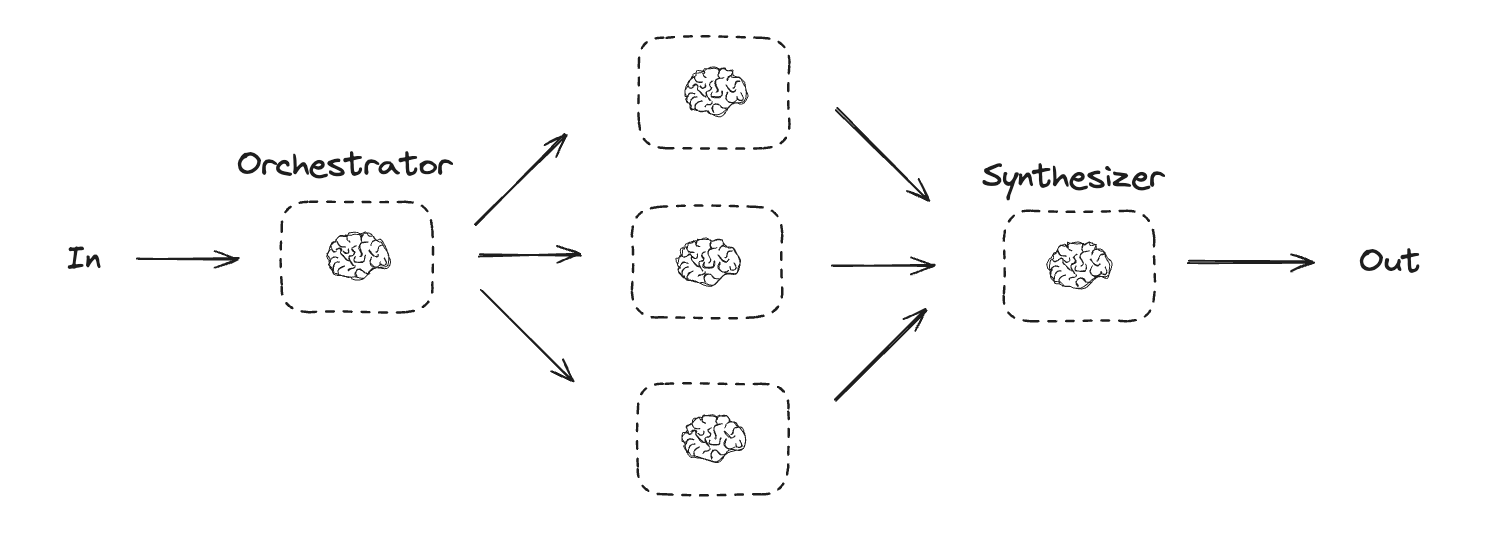
오케스트레이터-워커 구성에서 오케스트레이터는 다음을 수행합니다:- 작업을 하위 작업으로 분해
- 하위 작업을 워커에 위임
- 워커 출력을 최종 결과로 합성
Copy
type SectionSchema = {
    name: string;
    description: string;
}
type SectionsSchema = {
    sections: SectionSchema[];
}

// 구조화된 출력을 위한 스키마로 LLM 확장
const planner = llm.withStructuredOutput(sectionsSchema);
LangGraph에서 워커 생성하기
오케스트레이터-워커 워크플로우는 일반적이며 LangGraph는 이에 대한 내장 지원을 제공합니다.Send API를 사용하면 워커 노드를 동적으로 생성하고 특정 입력을 보낼 수 있습니다. 각 워커는 자체 상태를 가지며, 모든 워커 출력은 오케스트레이터 그래프에서 액세스할 수 있는 공유 상태 키에 기록됩니다. 이를 통해 오케스트레이터는 모든 워커 출력에 액세스하고 이를 최종 출력으로 합성할 수 있습니다. 아래 예제는 섹션 목록을 반복하고 Send API를 사용하여 각 워커에 섹션을 보냅니다.
Copy
import { Annotation, StateGraph, Send } from "@langchain/langgraph";

// 그래프 상태
const StateAnnotation = Annotation.Root({
  topic: Annotation<string>,
  sections: Annotation<SectionsSchema[]>,
  completedSections: Annotation<string[]>({
    default: () => [],
    reducer: (a, b) => a.concat(b),
  }),
  finalReport: Annotation<string>,
});

// 워커 상태
const WorkerStateAnnotation = Annotation.Root({
  section: Annotation<SectionsSchema>,
  completedSections: Annotation<string[]>({
    default: () => [],
    reducer: (a, b) => a.concat(b),
  }),
});

// 노드
async function orchestrator(state: typeof StateAnnotation.State) {
  // 쿼리 생성
  const reportSections = await planner.invoke([
    { role: "system", content: "Generate a plan for the report." },
    { role: "user", content: `Here is the report topic: ${state.topic}` },
  ]);

  return { sections: reportSections.sections };
}

async function llmCall(state: typeof WorkerStateAnnotation.State) {
  // 섹션 생성
  const section = await llm.invoke([
    {
      role: "system",
      content: "Write a report section following the provided name and description. Include no preamble for each section. Use markdown formatting.",
    },
    {
      role: "user",
      content: `Here is the section name: ${state.section.name} and description: ${state.section.description}`,
    },
  ]);

  // 업데이트된 섹션을 완료된 섹션에 작성
  return { completedSections: [section.content] };
}

async function synthesizer(state: typeof StateAnnotation.State) {
  // 완료된 섹션 목록
  const completedSections = state.completedSections;

  // 최종 섹션의 컨텍스트로 사용할 문자열로 완료된 섹션 형식 지정
  const completedReportSections = completedSections.join("\n\n---\n\n");

  return { finalReport: completedReportSections };
}

// 보고서의 각 섹션을 작성하는 llm_call 워커를 생성하는 조건부 엣지 함수
function assignWorkers(state: typeof StateAnnotation.State) {
  // Send() API를 통해 병렬로 섹션 작성 시작
  return state.sections.map((section) =>
    new Send("llmCall", { section })
  );
}

// 워크플로우 구축
const orchestratorWorker = new StateGraph(StateAnnotation)
  .addNode("orchestrator", orchestrator)
  .addNode("llmCall", llmCall)
  .addNode("synthesizer", synthesizer)
  .addEdge("__start__", "orchestrator")
  .addConditionalEdges(
    "orchestrator",
    assignWorkers,
    ["llmCall"]
  )
  .addEdge("llmCall", "synthesizer")
  .addEdge("synthesizer", "__end__")
  .compile();

// 실행
const state = await orchestratorWorker.invoke({
  topic: "Create a report on LLM scaling laws"
});
console.log(state.finalReport);
평가자-최적화기
평가자-최적화기 워크플로우에서 하나의 LLM 호출이 응답을 생성하고 다른 하나가 해당 응답을 평가합니다. 평가자나 휴먼-인-더-루프가 응답이 개선이 필요하다고 판단하면 피드백이 제공되고 응답이 재생성됩니다. 이 루프는 허용 가능한 응답이 생성될 때까지 계속됩니다. 평가자-최적화기 워크플로우는 작업에 대한 특정 성공 기준이 있지만 해당 기준을 충족하기 위해 반복이 필요한 경우에 일반적으로 사용됩니다. 예를 들어, 두 언어 간에 텍스트를 번역할 때 항상 완벽한 일치가 있는 것은 아닙니다. 두 언어에서 같은 의미를 가진 번역을 생성하는 데 몇 번의 반복이 필요할 수 있습니다.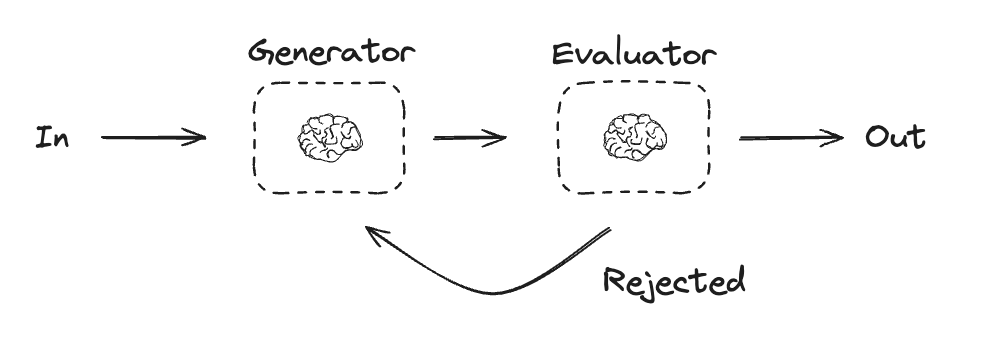
Copy
import * as z from "zod";
import { Annotation, StateGraph } from "@langchain/langgraph";

// 그래프 상태
const StateAnnotation = Annotation.Root({
  joke: Annotation<string>,
  topic: Annotation<string>,
  feedback: Annotation<string>,
  funnyOrNot: Annotation<string>,
});

// 평가에 사용할 구조화된 출력을 위한 스키마
const feedbackSchema = z.object({
  grade: z.enum(["funny", "not funny"]).describe(
    "Decide if the joke is funny or not."
  ),
  feedback: z.string().describe(
    "If the joke is not funny, provide feedback on how to improve it."
  ),
});

// 구조화된 출력을 위한 스키마로 LLM 확장
const evaluator = llm.withStructuredOutput(feedbackSchema);

// 노드
async function llmCallGenerator(state: typeof StateAnnotation.State) {
  // LLM이 농담을 생성
  let msg;
  if (state.feedback) {
    msg = await llm.invoke(
      `Write a joke about ${state.topic} but take into account the feedback: ${state.feedback}`
    );
  } else {
    msg = await llm.invoke(`Write a joke about ${state.topic}`);
  }
  return { joke: msg.content };
}

async function llmCallEvaluator(state: typeof StateAnnotation.State) {
  // LLM이 농담을 평가
  const grade = await evaluator.invoke(`Grade the joke ${state.joke}`);
  return { funnyOrNot: grade.grade, feedback: grade.feedback };
}

// 평가자의 피드백에 따라 농담 생성기로 되돌아가거나 종료하는 조건부 엣지 함수
function routeJoke(state: typeof StateAnnotation.State) {
  // 평가자의 피드백에 따라 농담 생성기로 되돌아가거나 종료
  if (state.funnyOrNot === "funny") {
    return "Accepted";
  } else if (state.funnyOrNot === "not funny") {
    return "Rejected + Feedback";
  }
}

// 워크플로우 구축
const optimizerWorkflow = new StateGraph(StateAnnotation)
  .addNode("llmCallGenerator", llmCallGenerator)
  .addNode("llmCallEvaluator", llmCallEvaluator)
  .addEdge("__start__", "llmCallGenerator")
  .addEdge("llmCallGenerator", "llmCallEvaluator")
  .addConditionalEdges(
    "llmCallEvaluator",
    routeJoke,
    {
      // routeJoke에서 반환된 이름 : 다음으로 방문할 노드 이름
      "Accepted": "__end__",
      "Rejected + Feedback": "llmCallGenerator",
    }
  )
  .compile();

// 실행
const state = await optimizerWorkflow.invoke({ topic: "Cats" });
console.log(state.joke);
에이전트
에이전트는 일반적으로 도구를 사용하여 작업을 수행하는 LLM으로 구현됩니다. 이들은 지속적인 피드백 루프로 작동하며, 문제와 솔루션을 예측할 수 없는 상황에서 사용됩니다. 에이전트는 워크플로우보다 더 많은 자율성을 가지며, 사용하는 도구와 문제를 해결하는 방법에 대한 결정을 내릴 수 있습니다. 사용 가능한 도구 세트와 에이전트의 동작 방식에 대한 가이드라인을 여전히 정의할 수 있습니다.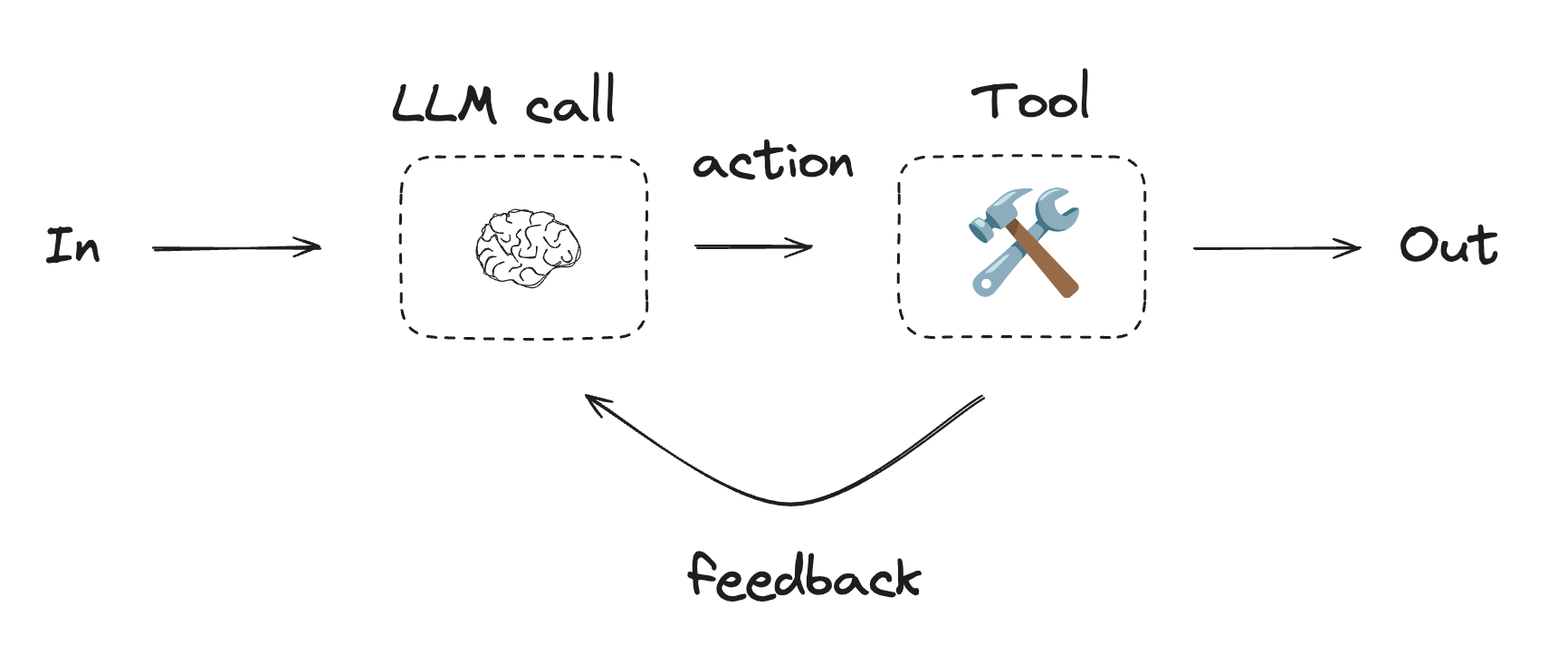
에이전트를 시작하려면 퀵스타트를 참조하거나 LangChain에서 에이전트가 작동하는 방식에 대해 자세히 읽어보세요.
Using tools
Copy
import { tool } from "@langchain/core/tools";
import * as z from "zod";

// 도구 정의
const multiply = tool(
  ({ a, b }) => {
    return a * b;
  },
  {
    name: "multiply",
    description: "Multiply two numbers together",
    schema: z.object({
      a: z.number().describe("first number"),
      b: z.number().describe("second number"),
    }),
  }
);

const add = tool(
  ({ a, b }) => {
    return a + b;
  },
  {
    name: "add",
    description: "Add two numbers together",
    schema: z.object({
      a: z.number().describe("first number"),
      b: z.number().describe("second number"),
    }),
  }
);

const divide = tool(
  ({ a, b }) => {
    return a / b;
  },
  {
    name: "divide",
    description: "Divide two numbers",
    schema: z.object({
      a: z.number().describe("first number"),
      b: z.number().describe("second number"),
    }),
  }
);

// 도구로 LLM 확장
const tools = [add, multiply, divide];
const toolsByName = Object.fromEntries(tools.map((tool) => [tool.name, tool]));
const llmWithTools = llm.bindTools(tools);
Copy
import { MessagesAnnotation, StateGraph } from "@langchain/langgraph";
import { ToolNode } from "@langchain/langgraph/prebuilt";
import {
  SystemMessage,
  ToolMessage
} from "@langchain/core/messages";

// 노드
async function llmCall(state: typeof MessagesAnnotation.State) {
  // LLM이 도구를 호출할지 여부를 결정
  const result = await llmWithTools.invoke([
    {
      role: "system",
      content: "You are a helpful assistant tasked with performing arithmetic on a set of inputs."
    },
    ...state.messages
  ]);

  return {
    messages: [result]
  };
}

const toolNode = new ToolNode(tools);

// 도구 노드로 라우팅하거나 종료하는 조건부 엣지 함수
function shouldContinue(state: typeof MessagesAnnotation.State) {
  const messages = state.messages;
  const lastMessage = messages.at(-1);

  // LLM이 도구를 호출하면 작업 수행
  if (lastMessage?.tool_calls?.length) {
    return "toolNode";
  }
  // 그렇지 않으면 중지(사용자에게 응답)
  return "__end__";
}

// 워크플로우 구축
const agentBuilder = new StateGraph(MessagesAnnotation)
  .addNode("llmCall", llmCall)
  .addNode("toolNode", toolNode)
  // 노드를 연결하는 엣지 추가
  .addEdge("__start__", "llmCall")
  .addConditionalEdges(
    "llmCall",
    shouldContinue,
    ["toolNode", "__end__"]
  )
  .addEdge("toolNode", "llmCall")
  .compile();

// 실행
const messages = [{
  role: "user",
  content: "Add 3 and 4."
}];
const result = await agentBuilder.invoke({ messages });
console.log(result.messages);
Connect these docs programmatically to Claude, VSCode, and more via MCP for real-time answers.